객체가 내부 상태가 변화했을때 행동도 변화시키게 하는 패턴이다.
객체는 클래스에서 변화된 것이 보인다.
예를들어 차를 프로그래밍 한다고 해보자.
차 시동이 꺼져있으면(상태) 엑셀을 밟아도 움직이지않는다(행동)
차 시동이 꺼져있으면(상태) 키를 돌리면(행동) 차 시동이 켜진다(상태)
이런느낌이다
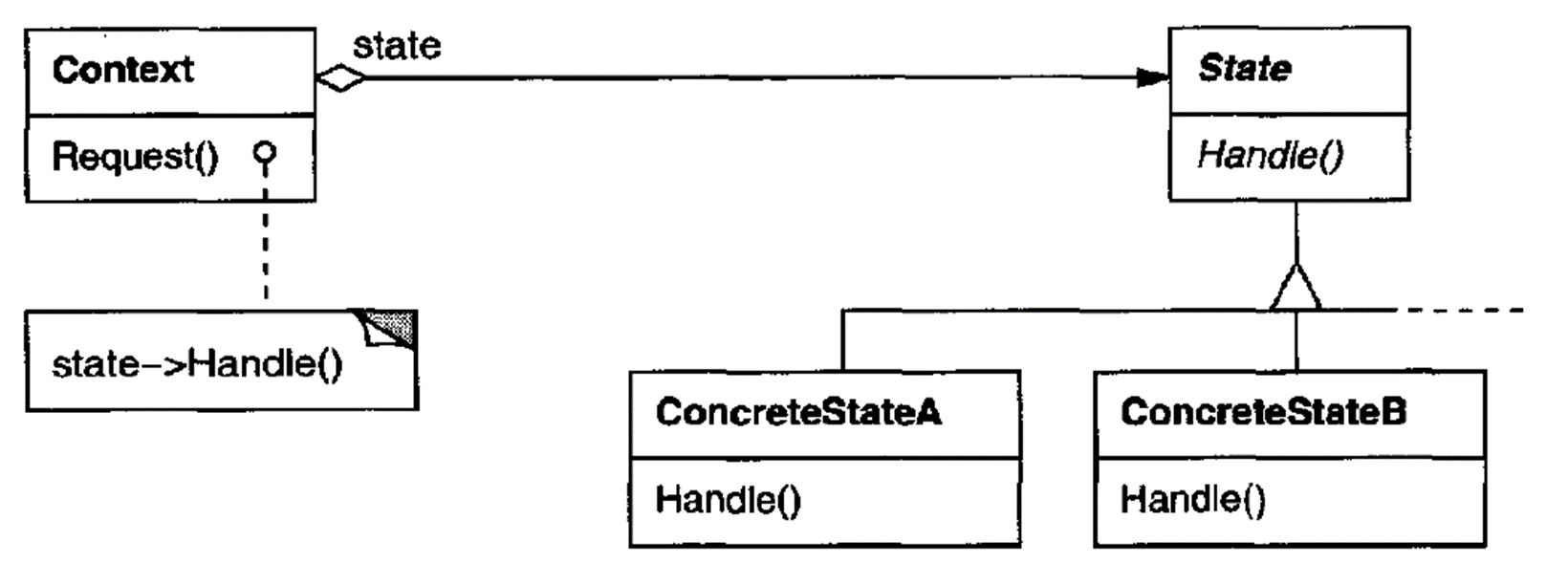
Car 클래스
public class Car
{
private State _state;
public Car()
{
ChangeState(new Off(this));
}
public bool HandleInput(string input)
{
switch (input)
{
case "turn-clockwise":
_state.TurnKeyClockwise();
break;
case "turn-counter":
_state.TurnKeyCounterClockwise();
break;
case "gas":
_state.PressGas();
break;
case "brake":
_state.PressBrake();
break;
case "exit":
return false;
}
return true;
}
public void ChangeState(State state)
{
_state = state;
}
}
Off 스테이트
public class Off : State
{
public Off(Car car) : base(car) { }
public override void TurnKeyClockwise()
{
Console.WriteLine("The engine has started");
Console.WriteLine();
_car.ChangeState(new Stopped(_car));
}
}
Driving State
public class Driving : State
{
public Driving(Car car) : base(car) { }
public override void TurnKeyClockwise()
{
Console.WriteLine("You hear a grinding noise...");
Console.WriteLine();
}
public override void TurnKeyCounterClockwise()
{
Console.WriteLine("The engine turns off, and the car stops suddenly");
Console.WriteLine();
_car.ChangeState(new Off(_car));
}
public override void PressBrake()
{
Console.WriteLine("The car slows to a stop");
Console.WriteLine();
_car.ChangeState(new Stopped(_car));
}
}
Stopped state ( 시동은 걸린상태)
public class Stopped : State
{
public Stopped(Car car) : base(car) { }
public override void PressGas()
{
Console.WriteLine("The car begins to drive");
Console.WriteLine();
_car.ChangeState(new Driving(_car));
}
public override void TurnKeyClockwise()
{
Console.WriteLine("You hear a grinding noise...");
Console.WriteLine();
}
public override void TurnKeyCounterClockwise()
{
Console.WriteLine("The engine has stopped");
Console.WriteLine();
_car.ChangeState(new Off(_car));
}
}
메인코드
class Program
{
static void Main(string[] args)
{
var car = new Car();
string input;
bool keepRunning = true;
Console.WriteLine("Welcome to the Driving Simulater");
Console.WriteLine();
Console.WriteLine("Usage:");
Console.WriteLine(" turn-clockwise -Turns the car's key clockwise");
Console.WriteLine(" turn-counter -Turns the car's key counter clockwise");
Console.WriteLine(" gas -Presses the gas pedal");
Console.WriteLine(" brake -Presses the brake pedal");
Console.WriteLine(" exit -Exits the simulator");
Console.WriteLine();
do
{
Console.Write("> ");
input = Console.ReadLine();
Console.WriteLine();
keepRunning = car.HandleInput(input);
} while (keepRunning);
Console.WriteLine();
Console.WriteLine("goodbye");
Console.WriteLine();
}
}
'개인공부 > 소프트웨어 개발 패턴' 카테고리의 다른 글
| Facade 파사드 패턴(구조패턴) (0) | 2024.10.28 |
|---|---|
| Observer 옵저버 패턴(행동패턴) (1) | 2024.10.25 |
| Memento 메멘토 패턴(행동패턴) (0) | 2024.10.22 |
| (구조패턴)Decorator 데코레이터 패턴 (1) | 2024.10.18 |
| (구조패턴) Bridge 브릿지 패턴 (0) | 2024.10.17 |


