브릿지 패턴은 추상메서드에서 추상과 구현을 디커플 시켜 두개가 독립적으로 일어날 수 있게 하는 것이다.
쉽게 말해서 여러 다른 바리에이션들이 추가될때 문제가 생기지 않게 약간은 느슨하게 만들어 두는 것이라 할 수 있다.
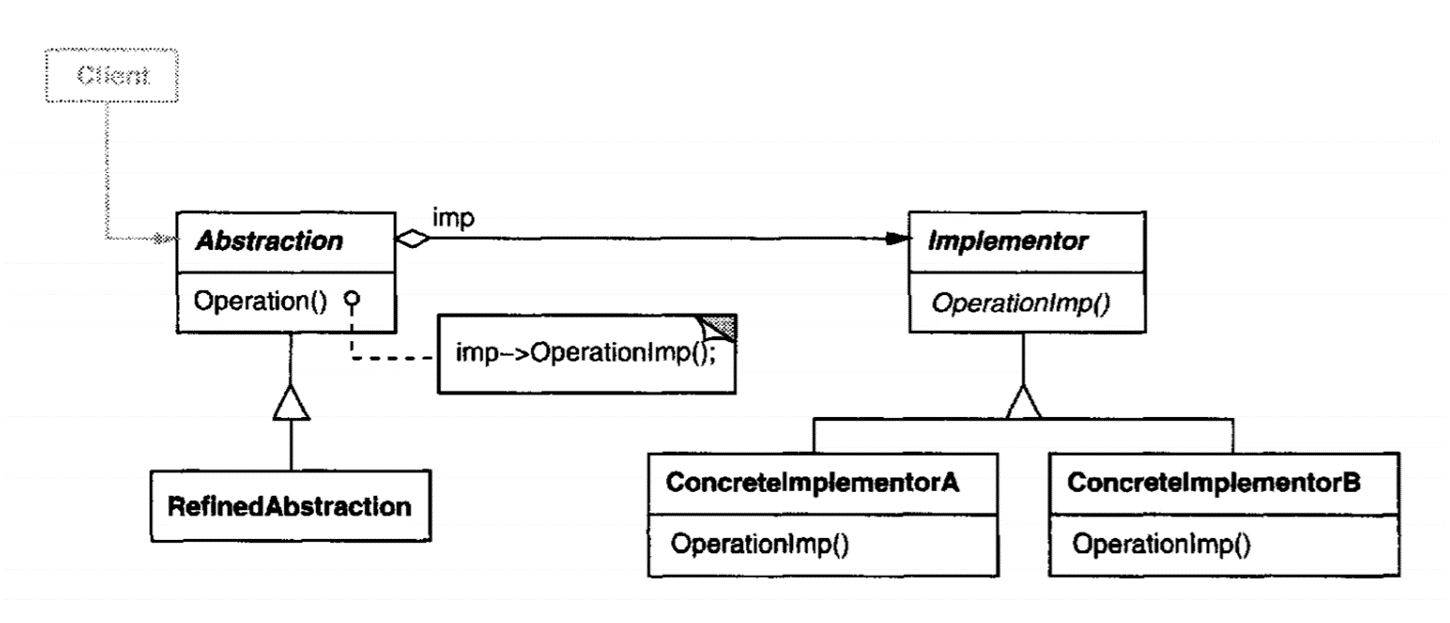
구조에서 보다시피 구현에 해당하는 클래스를 따로 만들어 다른 자식 클래스들이 Implementor 를 거쳐서 구현을 하게 디자인을 하는 것을 볼 수 있다.
예시 코드는 창문이 예시이다
Abstraction
internal abstract class Window
{
protected IWindowImplemntation windowImpl;
public Window(IWindowImplemntation windowImpl)
{
this.windowImpl = windowImpl;
}
public abstract void DrawRect();
public abstract void DrawText();
}
RefinedAbstraction
internal class IconWindow : Window
{
// Hiding interface behind the abstract class
public IconWindow(IWindowImplemntation impl) : base(impl) { }
public override void DrawRect()
{
Console.WriteLine("Pretend this is in an icon window...");
windowImpl.DrawLine();
windowImpl.DrawLine();
windowImpl.DrawLine();
windowImpl.DrawLine();
}
public override void DrawText()
{
Console.WriteLine("Pretend this is in an icon window...");
windowImpl.DrawText();
}
}
RefinedAbstraction -> 아이콘윈도우를 상속받은 것을 알 수 있다.
internal class TransientWindow : IconWindow
{
public TransientWindow(IWindowImplemntation impl) : base(impl) { }
public override void DrawRect()
{
Console.WriteLine("Pretend this is in an Transient window...");
}
}
Implementor
internal interface IWindowImplemntation
{
void DrawText();
void DrawLine();
}
ConcreteImplementor1
internal class MacWindow : IWindowImplemntation
{
public void DrawText()
{
Console.WriteLine("Here's some MAC text...");
}
public void DrawLine()
{
Console.WriteLine("Mac: ------");
}
}
ConcreteImplementor2
internal class WindowsWindow : IWindowImplemntation
{
public void DrawText()
{
Console.WriteLine("Here's some Windows text...");
}
public void DrawLine()
{
Console.WriteLine("Windows: ----------------------------");
}
}
메인
static void Main(string[] args)
{
Window window = new IconWindow(new MacWindow());
Console.WriteLine("\n");
window.DrawRect();
window.DrawText();
Window window2 = new IconWindow(new WindowsWindow());
window2.DrawRect();
window2.DrawText();
Console.WriteLine("\n");
Window window3 = new TransientWindow(new WindowsWindow());
window3.DrawRect();
window3.DrawText();
Console.WriteLine("\n");
}
결과
Pretend this is in an icon window...
Mac: ------
Mac: ------
Mac: ------
Mac: ------
Pretend this is in an icon window...
Here's some MAC text...
Pretend this is in an icon window...
Windows: ----------------------------
Windows: ----------------------------
Windows: ----------------------------
Windows: ----------------------------
Pretend this is in an icon window...
Here's some Windows text...
Pretend this is in an Transient window...
Pretend this is in an icon window...
Here's some Windows text...
한마디로 표현하자면 Abstraction 의 RefinedAbstraction 은 무엇을 할까? (목적) 을 수행하게 만들고 -> 더 큰 그림
Implementor 의 ConcreteImplementor 들은 더 자세히 어떻게 할까?(방법) 을 수행하게 만든다. -> 작은 스케일의 구현
이라 생각하면 쉽다.
'개인공부 > 소프트웨어 개발 패턴' 카테고리의 다른 글
| Memento 메멘토 패턴(행동패턴) (0) | 2024.10.22 |
|---|---|
| (구조패턴)Decorator 데코레이터 패턴 (1) | 2024.10.18 |
| (구조패턴) Adapter 어댑터 패턴 (2) | 2024.10.17 |
| (구조패턴) Composite 컴포짓 패턴 (0) | 2024.10.16 |
| (생성패턴) Builder 빌더 디자인 패턴 (0) | 2024.10.16 |


