Composite 패턴은 객체 하나를 여러객체의 트리모양으로 만들어서 트리 구조처럼 서열을 만들어준다.
쉽게 말해서, 하나의 객체를 만들기 위해서 여러 객체를 블록처럼 쌓아서 하나의 객체를 만드는 그냥 분할시켜준것이다.
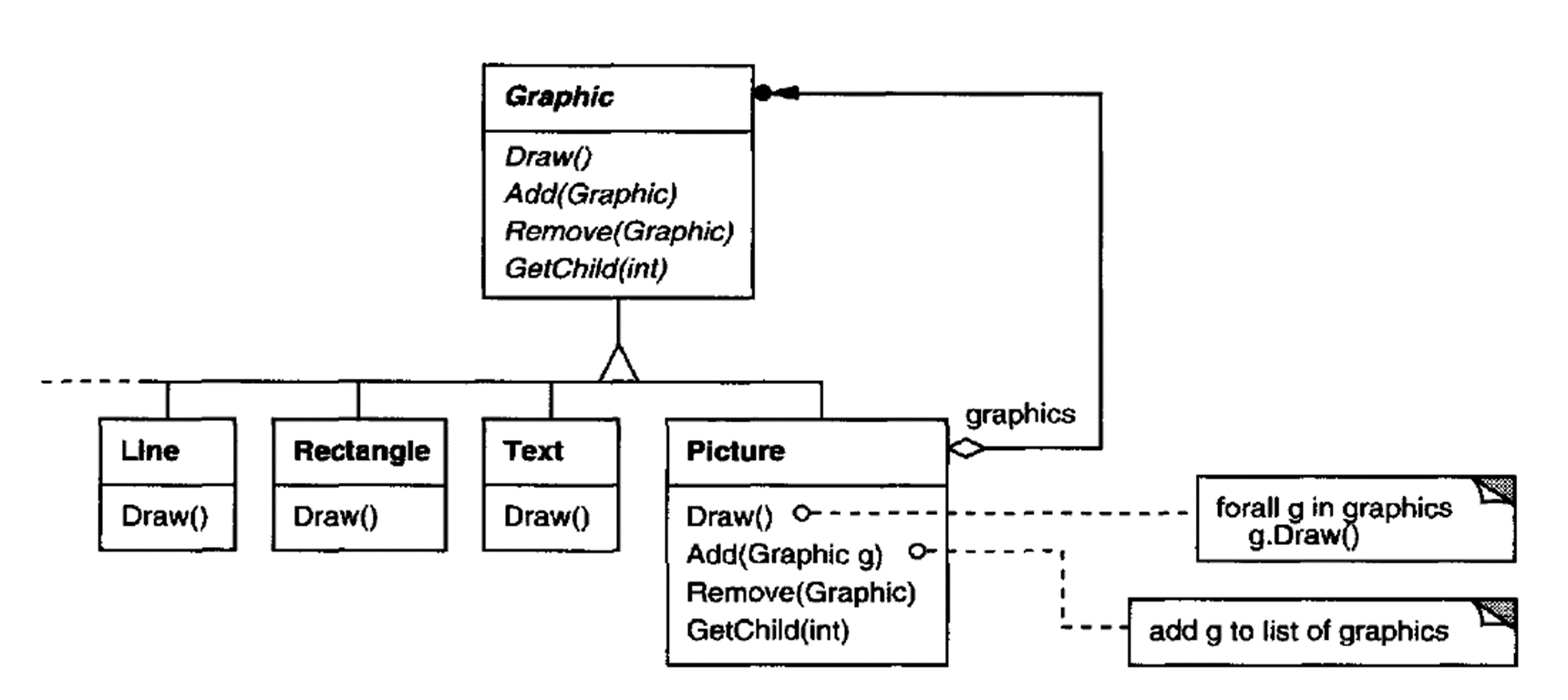
이번 코드 예시에서는 여러가지 도형들(객체들) 을 이용해 하나의 그래픽을 표현하는 프로그램을 만들어 볼 것이다.
여러 객체들의 부모 클래스 ( 그래픽 ) -> 그래픽은 선, 도형들을 포함도 하지만 이 선 도형들을 포함할 사진도 포함한다.
즉 한눈으로 보자면
그래픽
사진
선 도형
순서로 쌓여있는 것 이다.
internal abstract class Graphic
{
public abstract void Draw();
public virtual void Add(Graphic graphic)
{
throw new NotImplementedException();
}
public virtual void Remove(Graphic graphic)
{
throw new NotImplementedException();
}
public virtual Graphic GetChild(int index)
{
throw new NotImplementedException();
}
}
1. 선
internal class Line : Graphic
{
int length;
public Line(int length)
{
this.length = length;
}
public override void Draw()
{
for(int i=0; i<length; ++i)
{
Console.Write("_");
}
Console.Write("\n");
}
}
2. 직사각형
internal class Rectangle : Graphic
{
private int _width;
private int _height;
public Rectangle(int width, int height)
{
_width = width;
_height = height;
}
public override void Draw()
{
for (int yIndex = 0; yIndex < _height; yIndex++)
{
for (int xIndex = 0; xIndex < _width; xIndex++)
{
Console.Write("■");
}
Console.WriteLine();
}
Console.WriteLine();
Console.WriteLine();
}
}
3. 글
internal class Text : Graphic
{
string text;
public Text(string text)
{
this.text = text;
}
public override void Draw()
{
Console.WriteLine($"{text}\n");
}
}
타겟 클래스 -> 사진
internal class Picture : Graphic
{
List<Graphic> graphics = new List<Graphic>();
public override void Draw()
{
Console.WriteLine("Start of Picture.Draw()");
foreach(var graphicsItem in graphics)
{
graphicsItem.Draw();
}
Console.WriteLine("End of Picture.Draw()");
}
public override void Add(Graphic graphic)
{
graphics.Add(graphic);
}
public override void Remove(Graphic graphic)
{
graphics.Remove(graphic);
}
public override Graphic GetChild(int index)
{
return graphics[index];
}
}
메인
internal class Program
{
static void Main(string[] args)
{
var graphics = new List<Graphic>();
graphics.Add(new Line(15));
graphics.Add(new Text("This is some text..."));
graphics.Add(new Rectangle(5, 10));
var picture = new Picture(); // this is the composite object
picture.Add(new Text("This is some more text...just in the picture..."));
picture.Add(new Rectangle(5, 5));
graphics.Add(picture);
var picture2 = new Picture();// this is the composite object
picture2.Add(new Text("This is in picture 2..."));
picture.Add(picture2);
foreach (var graphic in graphics)
{
graphic.Draw();
}
}
}
결과 값
_______________
This is some text...
■■■■■
■■■■■
■■■■■
■■■■■
■■■■■
■■■■■
■■■■■
■■■■■
■■■■■
■■■■■
Start of Picture.Draw()
This is some more text...just in the picture...
■■■■■
■■■■■
■■■■■
■■■■■
■■■■■
Start of Picture.Draw()
This is in picture 2...
End of Picture.Draw()
End of Picture.Draw()
코드를 잘 보면 첫 선, 텍스트 5x10 직사각형이 나오고
사진을 출력 -> 사진안에 있는 정보 출력
이후 사진안에 사진 출력
이후 순서대로 닫힌다.
트리구조와 유사함을 주목하자.
'개인공부 > 소프트웨어 개발 패턴' 카테고리의 다른 글
| (구조패턴) Bridge 브릿지 패턴 (0) | 2024.10.17 |
|---|---|
| (구조패턴) Adapter 어댑터 패턴 (2) | 2024.10.17 |
| (생성패턴) Builder 빌더 디자인 패턴 (0) | 2024.10.16 |
| (생성패턴) Abstract Factory 추상 팩토리 패턴 (1) | 2024.10.15 |
| (생성패턴) Factory Method : 팩토리메서드 패턴 (1) | 2024.10.15 |


